
Download 4UOnly – Secure Password Manager for Windows (Free, Lightweight & Encrypted)
Looking for a reliable, free password manager for Windows? 4UOnly is a trusted, lightweight security tool designed to help you protect your digital identity. Since its debut in 2004, this password manager has been a go-to solution for users seeking a simple yet secure way to store and manage login credentials.
With strong encryption, a user-friendly interface, and minimal system requirements, 4UOnly is ideal for individuals who want to avoid identity theft without the complexity of modern password managers. Available exclusively for Windows 95 and earlier versions, it’s a legacy tool that still delivers solid performance for basic password management needs. Whether you're managing personal accounts or securing sensitive login data, 4UOnly ensures your information stays safe and accessible only to you.
Why Choose 4UOnly as Your Free Password Manager?
When it comes to digital security, choosing the right password manager is crucial. 4UOnly stands out in the crowded field of password managers by offering a no-nonsense, secure, and free solution tailored specifically for older Windows systems. Unlike many modern tools that require constant updates, cloud sync, and high-end hardware, 4UOnly is designed for simplicity and efficiency. Its core strength lies in its ability to store all your passwords in a single, encrypted vault, eliminating the need to remember complex login details for every website and service.
Security is paramount, and 4UOnly doesn’t compromise here. It uses robust encryption algorithms to safeguard your data, ensuring that even if someone gains access to your file, they won’t be able to decrypt your passwords without the master key. This makes it a reliable choice for users who value privacy and data protection. The software is also remarkably lightweight—taking up far less disk space than the average security application—making it perfect for older or low-resource systems.
Another major advantage is its long-standing presence in the software community. Since 2004, over 6,500 users have downloaded 4UOnly, with consistent interest from regions like Denmark, indicating its enduring trustworthiness. While it hasn’t seen updates since 2006, this stability means the software has been battle-tested over time. For users who prioritize security over flashy features, 4UOnly remains a solid, dependable option that delivers on its promise: secure, centralized password management without the bloat.
Key Features and How to Use 4UOnly
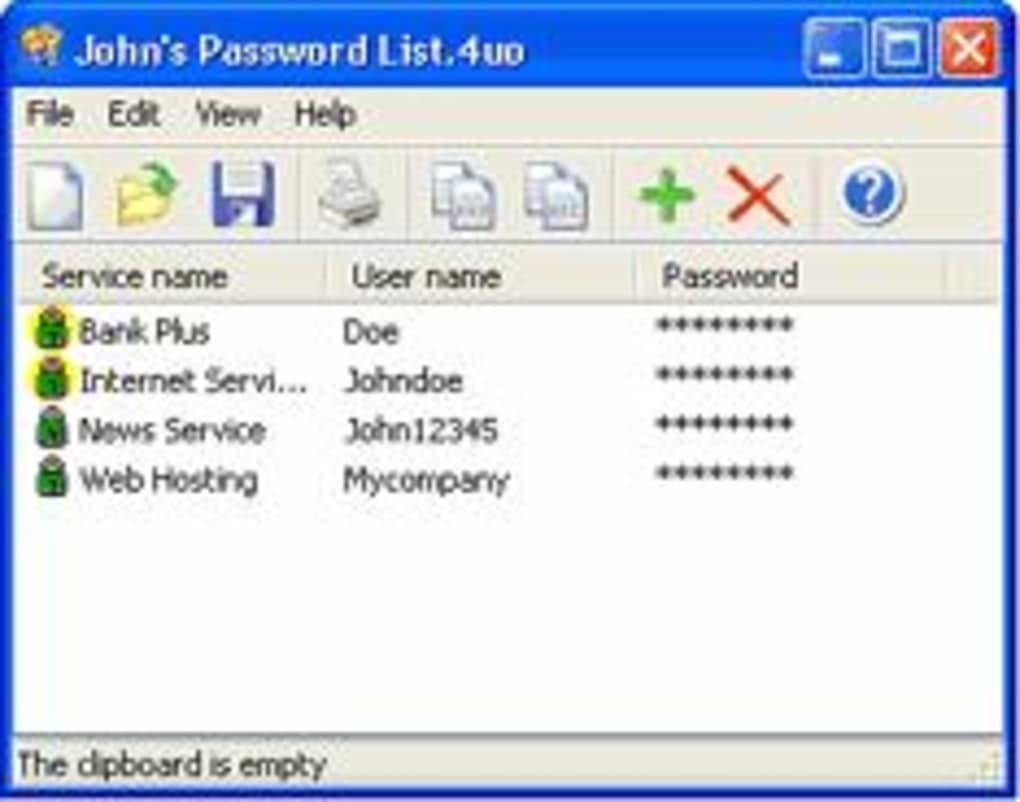
Despite its age, 4UOnly includes a suite of essential features that make it effective for everyday password management. The primary function is storing login credentials—usernames, passwords, URLs, and notes—inside an encrypted vault. This vault is protected by a master password, which acts as the only key to access your data. Once unlocked, you can view, edit, or auto-fill credentials with just a few clicks, streamlining your login process across multiple platforms.
One of the standout features is its simplicity. There’s no need to navigate complex menus or learn advanced settings. The interface is clean and intuitive, making it accessible even for users with limited technical experience. You can easily add new entries by filling in the required fields, and the program supports custom notes for additional context—perfect for storing recovery codes or account hints.
For usage, simply download the installer from a trusted source, run it, and follow the setup wizard. After installation, launch the app and set your master password. From there, you can start adding your accounts.
The software doesn’t require an internet connection, so your data remains offline and secure. While it lacks modern features like cloud backup or auto-sync across devices, this also means your data stays completely under your control—no third-party servers involved. For users who prefer offline storage and minimal dependencies, 4UOnly offers a refreshingly straightforward experience.
Compatibility and Installation Guide
4UOnly is specifically designed for older Windows operating systems, including Windows 95, 98, ME, and earlier versions. It is not compatible with modern systems like Windows 10, 11, or any macOS, Android, or iOS devices. This limitation means it’s best suited for users still running legacy systems or those who value compatibility with older hardware.
To install 4UOnly, ensure your system meets the minimum requirements: a Windows 95-compatible machine with at least 16 MB of RAM and 2 MB of free disk space. Download the installer from a reputable source (avoid unofficial or suspicious websites to prevent malware). Once downloaded, double-click the file and follow the on-screen instructions. The installation process is quick and doesn’t require administrative privileges in most cases.
After installation, launch the application and create a master password—this is the most critical step. Choose a strong, unique password and store it securely, as forgetting it will permanently lock you out of your vault. Once set, you can begin adding your accounts. The software doesn’t auto-update, so you’ll need to manually check for new versions if they become available (though the last update was in 2006).
For optimal security, avoid storing the vault file on shared or public computers. Keep it on a personal, password-protected drive. While the lack of modern compatibility is a drawback, the trade-off is a stable, lightweight tool that continues to function reliably on older systems.
Pros and Cons of Using 4UOnly
- Pros:
- Free and lightweight – consumes minimal system resources
- Strong encryption to protect stored passwords
- Simple, intuitive interface – easy for beginners
- Offline operation – no cloud dependency or internet required
- Proven track record – trusted by over 6,500 users since 2004
- Cons:
- Only compatible with Windows 95 and earlier versions
- No cloud sync or cross-device access
- Not updated since 2006 – no support for modern security standards
- Limited to single-user, local storage – no sharing or team features
- Lack of modern features like auto-fill, password generator, or breach alerts
Frequently Asked Questions (FAQ)
Is 4UOnly safe to download and use?
Yes, 4UOnly is considered safe when downloaded from trusted sources. It has been in use since 2004 with no major security breaches reported. However, due to its age and lack of updates, it’s recommended only for offline use on isolated systems. Always scan the installer with antivirus software before running it.
Can I use 4UOnly on Windows 10 or 11?
No, 4UOnly is not compatible with Windows 10, 11, or any newer operating systems. It was designed for Windows 95 and earlier versions. Running it on modern systems may result in errors or crashes. For newer systems, consider using modern alternatives like Bitwarden, 1Password, or KeePass.
Does 4UOnly support password generation?
No, 4UOnly does not include a built-in password generator. You’ll need to create strong passwords manually or use an external tool. However, the software allows you to store any password you create, including complex ones.
What happens if I forget my master password?
If you forget your master password, there is no recovery option. The encryption is designed to be unbreakable without the correct key. You will permanently lose access to your vault. Always write down your master password and store it securely in a physical location.
Can I transfer my vault to another computer?
Yes, you can copy the vault file (usually with a .4uo extension) to another Windows 95-compatible system. Just ensure both systems have 4UOnly installed. This allows you to access your data on multiple legacy machines, though it’s not recommended for shared or public computers.
Final Verdict: Is 4UOnly Still Worth It?
While 4UOnly may not meet the needs of users on modern systems, it remains a valuable tool for those still using older Windows environments. Its lightweight design, strong encryption, and no-cost model make it a reliable choice for managing passwords offline. For users who prioritize privacy, simplicity, and control over their data, 4UOnly offers a proven solution that’s stood the test of time.
If you’re running a legacy system and need a secure, no-frills password manager, download 4UOnly today and take a step toward better digital security. Just remember to use it responsibly—keep your master password safe, avoid public access, and consider backing up your vault file.
For modern users, while 4UOnly is outdated, its core principles—strong encryption, offline storage, and simplicity—remain relevant. Explore current alternatives if you need cloud sync or cross-device support, but for legacy users, 4UOnly is still a solid, free, and secure option.







